Version 1.0 - Last Updated: 08 Jul 2025
Creating LLE courses
Creating a Core Course
Introduction
This document contains step by step guidance on creating and submitting courses within the new Courses Management Service (CMS) for the Lifelong Learning Entitlement (LLE). It outlines important fields and processes you must follow when entering course information. It also contains the updated terminology and functionality introduced under LLE.
Before adding any courses, please make sure you have read the Course Service Definition. It contains information on new LLE terminology, credit rules, and field definitions used throughout CMS.
You must only enter courses that are designated for support under LLE. Entering non-designated courses may result in rejection or delays during validation. You should refer to the Courses Guidance Chapter to confirm designation before creating a course. You can find this under 2026/27 Guidance Chapters.
This guidance will help with accurate course submissions and avoid delays during validation.
If your course does not clearly fit within the options available in CMS, or you're unsure how to proceed, you should contact your HEP Account Manager before creating the course.
Creating a Core Course
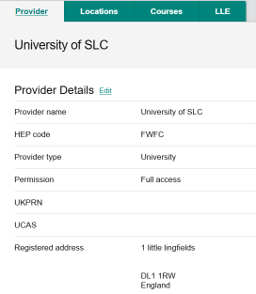
To begin creating a new LLE course, select the LLE tab from the provider page. This will open the LLE dashboard, where you carry out course creation and management activities.
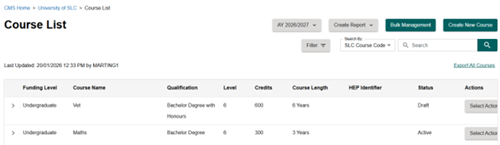
From the dashboard, select View Course List on the course submissions section. This will display all the courses that you’ve created to date.

You can create a new core course by selecting the green Create New Course button.
Before creating a course, you must make sure it meets LLE designation requirements. Refer to the 2026/27 Guidance Chapters.
This opens the course creation screen, where you can enter the course information needed.
Core course details capture the main information that does not typically change year to year.
We’ll capture the following core course information:
- Course Type
- Course Name
- Qualification
- Qualification Credits
- Course Length
- Course Attributes
- UCAS code (optional)
- HEP Identifier (Optional)
Course Type
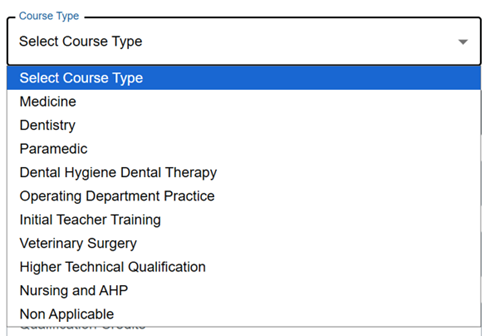
Course Type identifies the category that best reflects the nature of the course you’re creating. This enables us to apply the correct funding and entitlement rules during student assessment.
You must make sure that the selected course type accurately reflects the provision being delivered.
The course type you select will also determine what attributes can be added to a course.
Where a course does not fall within any of the defined categories, you should select Non‑Applicable.
You should create midwifery courses using the course type, 'Nursing'.
If you’re unsure which course type to select, refer to the 2026/27 Guidance Chapters for definitions of designated course types under LLE.
Qualification
The Qualification field records the specific award that the course leads to. You must make sure that the qualification you select reflects the full programme. This should be the qualification that the student will achieve upon successful completion of the entire course, rather than interim or exit awards.
Selecting the correct qualification is essential. It determines elements of the course record, including:
- fee‑limit rules
- credit requirements
- the overall course structure used throughout the CMS setup process
You must make sure that the qualification is designated for LLE support.
Refer to the 2026/27 Guidance Chapters for approved qualification types.

You should make sure to choose the qualification that matches the definitive programme documentation and approved academic framework for the course. This means that subsequent fields such as Qualification Credits, Course Length and variant level details align with the formal qualification. This helps support accurate assessment of student funding entitlement.
Qualification Credits
When you’re creating a course you must enter the total number of credits for the full qualification. This should reflect the entire credit value of the course, up to the maximum amount specified in the per‑course credit limits. These limits are set by the Department for Education (DfE) and are outlined in the regulations and the course service definition.
If you have a specialist period like a foundation year, placement or study abroad, you should not include these credits in the qualification credits. These can be added on when creating the course variant.
The credit value must represent the full qualification, not an individual module or single year of study.
Credit values must align with LLE requirements and are used to determine funding entitlement. Refer to the 2026/27 Guidance Chapters for guidance on credit requirements.
It is recognised that certain elements of the non credit bearing courses listed in the courses guidance chapter will have learning hours that do not equate to physical credits. For example, placement hours as part of a nursing degree. For this reason, if there are elements of your course that are non credit bearing, to make sure you can charge the full tuition fee for your students on the course, you should use the per course amount figure listed in the course service definition for that qualification.
Course Length
Full time
You should enter the course length in years, and months where appropriate. For example, if you have a 9 month course you can enter it as either 1 year or 9 months. If you have an 18 month course you can enter it as 2 years or 1 year 6 months.
The course length should represent the total duration required to complete the full course from start to finish. This includes specialist periods like foundation, placement and study abroad years.
Part time
For part time courses, the course length should reflect the typical timeframe, based on the study intensity followed by most students. For example, if the full time course is 3 years and the part time pathway takes twice as long, you should record the course length as 6 years.
You can find guidance on how to amend credits for students who are not following the study intensity used when you created your course in the SIS user guide.
Attributes
Course attributes are collected to help identify specific courses or course years that may affect a student’s entitlement. The attributes include:
- Ambulance Trust
- NHS Bursary
- Intercalated
- Pre‑Registration
- Medicine/Dentistry
The attributes also consider whether these courses include specialist periods of study such as:
- Placement Years
- Study Abroad
- Foundation Year
The attributes available to select will vary depending on the type of course you’re entering into CMS.
You must select all attributes that apply to the course for the correct funding rules to be applied.
The attributes you select must reflect the actual course structure. Refer to the 2026/27 Guidance Chapters if you’re unsure which attributes apply.

The attributes you can select are:
NHS Bursary
This attribute applies to providers based in Wales. You should select it where the course attracts an NHS bursary.
Ambulance Trust
This attribute applies to paramedic courses where Ambulance Trust funding is provided. If you select this attribute, you’ll need to confirm what funding arrangements the ambulance trust provide.
If the course does not attract Ambulance Trust funding, do not select this attribute.
Study Abroad
You should select this attribute if the course includes a period of study abroad, including those delivered through the Turing Scheme.
Placement Year
You must select this attribute where the course includes a placement year.
Foundation Year
This attribute applies where the course includes a foundation year. This is a single attribute that covers both lower and higher-fee foundation years.
Pre-Registration
You must select this attribute to indicate that the course is a pre-registration programme. This includes social work programmes that lead to registration.
Intercalated
You should use this attribute to identify an intercalated course. It applies only to the one year intercalated course and cannot be added to courses longer than one year in duration.
Medicine/Dentistry
This attribute applies to Medicine or Dentistry courses. You must confirm whether the course is an undergraduate or graduate entry programme.