Version 1.0 - Last Updated: 15 Jul 2026
SIS LLE guidance
LLE applications
Filters
On entering this section, you can select one of the four options, as shown in the screenshot below:

Each option will allow you to carry out varying tasks, as indicated below:
- Applications filter
- Search Applications
- Export Applications
- View Detailed Application Information
- Registration Worklist filter
- Search Applications with Outstanding Registration
- Export Applications with Outstanding Registration
- Confirm Registration
- Attendance Worklist filter
- Search Applications with Outstanding Attendance
- Export Outstanding Attendance
- Confirm Attendance
- CoC Worklist filter
- Search Applications with Outstanding CoCs
- Export Applications with Outstanding CoCs
Applications
After selecting LLE Applications from the main menu, you'll see the following screen:

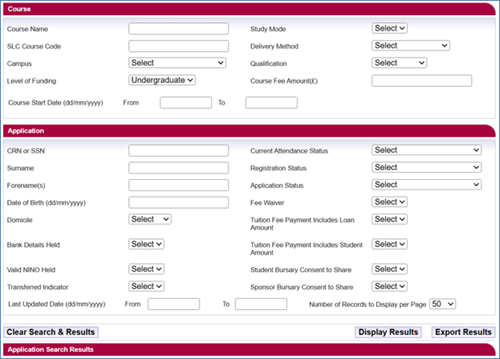
After clicking on the Applications radio button, you'll see the following screen: