Version 1.0 - Last Updated: 08 Jul 2025
SIS LLE guidance
Search fields
The fields available in the Application section include:
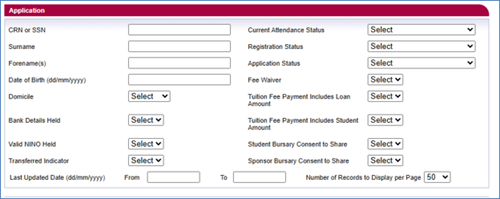
CRN or SSN
These are unique student identifiers issued by us.
Surname
The student’s last name
Forename(s)
The student’s first name.
Date of birth
The format is dd/mm/yyyy.
Domicile
A dropdown with a choice of domiciles.
Bank Details Held
This shows if we have the student’s bank details (Y or N).
Valid NINO Held
This shows if we have a valid National Insurance number for the student (Y or N).
Transferred Indicator
A dropdown that lets you filter students who have or have not transferred out of your university or college (Y or N).
Last Updated Date (dd/mm/yyyy) From/To
The date range you want to check for student information updates. You must both the To and From fields.
Current Attendance Status
A dropdown with a choice of current attendance statuses of the student. The list includes:
- Awaiting Attendance Confirmation
- Attendance Confirmed
- Attendance Confirmation Not Required
- Awaiting Reassessment
Registration Status
The registration status of the students you're searching for. The list includes:
- Awaiting Registration Confirmation
- Registration Confirmed
- Not Registered
- Registration Confirmation Not Required
Application Status
The application status of the students you're searching for. The options are:
- Approved
- Cancelled
- Withdrawn
- Suspended
Fee Waiver
The dropdown options are Y or N. Where you select Y, it will display all applications that have been awarded a Fee Waiver via the Bursary Administration Service (BAS).
Tuition Fee Payment Includes Loan Amount
A dropdown that lets you filter all student records where the tuition fee loan amount is equal to or not greater than zero.
Tuition Fee Payment Includes Student Amount
Where you select Y, it will display all student applications where there is an element of the tuition fee payable by the student.
Student Bursary Consent to Share
A dropdown that lets you filter students by those who have or have not given consent to share for bursary purposes.
Sponsor Bursary Consent to Share
A dropdown that lets you filter students whose sponsors have given consent to share for bursary purposes. If there are 2 sponsors, this will only show as Yes if both have given consent to share.
Number of Records To Display
The number of search results per page. The default is 50, but you can change it to 100 or 200.