Version 1.0 - Last Updated: 08 Jul 2025
Creating LLE courses
Creating a Core Module
This document provides step by step guidance on how to create and submit modules within the new Courses Management Service (CMS) for the Lifelong Learning Entitlement (LLE). It outlines the important fields, processes, and requirements you must follow when entering module information.
It also contains the updated terminology and functionality introduced under LLE.
Before adding any modules, please make sure you’ve read the Course Service Definition. It contains essential information on new LLE terminology, credit rules, and field definitions used throughout CMS.
Not all providers or subjects are approved for modular delivery under LLE. You must make sure your modules meet the designation set out in the 2026/27 Guidance Chapters before creating them in CMS. If a module or parent course does not meet these requirements, it will not be designated for support under LLE.
Following this guidance will help with accurate module submissions and avoid delays during validation.
If your course does not clearly fit within the options available in CMS, or you’re unsure how to proceed, you should contact your HEP Account Manager before creating the module.
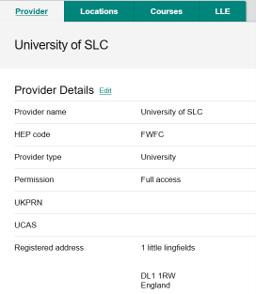
- To begin creating a new LLE module, select the LLE tab from the provider page. This will allow you to access to the LLE dashboard, where you carry out course creation and management activities.
- From the dashboard, select View Module List on the module submissions section. This displays all the modules you’ve created to date.

- To create a new module, select the Create New Module This opens the module creation screen, where you can enter the module information.

We’ll capture the following core module information:
- Module Name
- Parent Course
- Qualification Level
- Module Credit
- Module Length
- HEP Identifier (Optional)
Parent Course
The Parent Course links the module to the overarching qualification it forms part of. You must select the correct parent course as this determines the module’s funding eligibility, academic level, and alignment with the course structure already recorded in CMS.
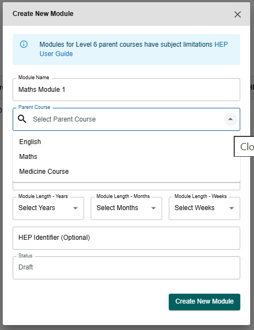
If you’ve created a core course and it’s eligible to be modularised, then you can select it as the parent course. If you’ve not created the parent course and if it’s not set to Active, you will not be able to add the module.
Only eligible parent courses can be modularised under LLE. Refer to the 2026/27 Guidance Chapters for module designation.
Qualification Level
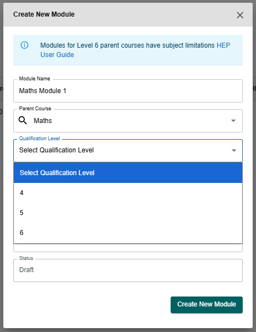
Modules at levels 4 to 6 can be funded under the LLE only if they derive from HTQ parent courses or Level 6 parent courses. This applies to in approved subject areas as identified by Skills England.
When you enter the module into CMS, you must select the qualification level the module is being studied at.
Module Credit
Module Credit records the credit value assigned to the module. This must reflect the formal academic credit delivered as part of the module. It should also align with the total credit structure of the parent qualification. The module credit you enter must be accurate, as this contributes to credit‑based fee limits and entitlement calculations under the LLE framework.
Module credit values must meet LLE requirements for designation and funding eligibility. Refer to the 2026/27 Guidance Chapters for further detail.
Module Length
The Module Length records the duration of the module and you can enter it in years, months, and weeks, depending on how you’re delivering the module. Make sure that the module length reflects the actual period during which the student is expected to complete the learning and assessment for the module. This helps support accurate mapping of study patterns across the academic cycle.
Print this chapter